
Wiki Cluster
Jujutsu Zero Codes (Roblox)
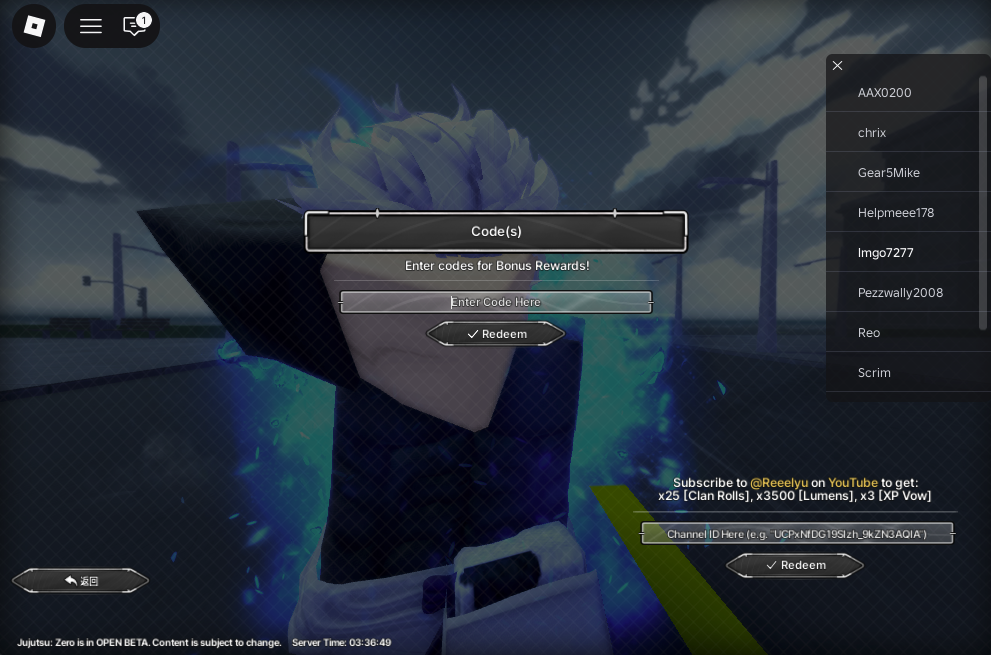
Redeem codes from the in-game “Code(s)” panel in Jujutsu Zero. Use the “Enter Code Here” box and press “Redeem”. Codes expire fast—bookmark this page and check the last verified time.
Active Codes
| Code | Reward | Status | Last verified (UTC) | Notes |
|---|---|---|---|---|
FREECLANSPINSYES | 1k Clan Spins | Working | 2025-12-21 00:00 | Confirmed in sources |
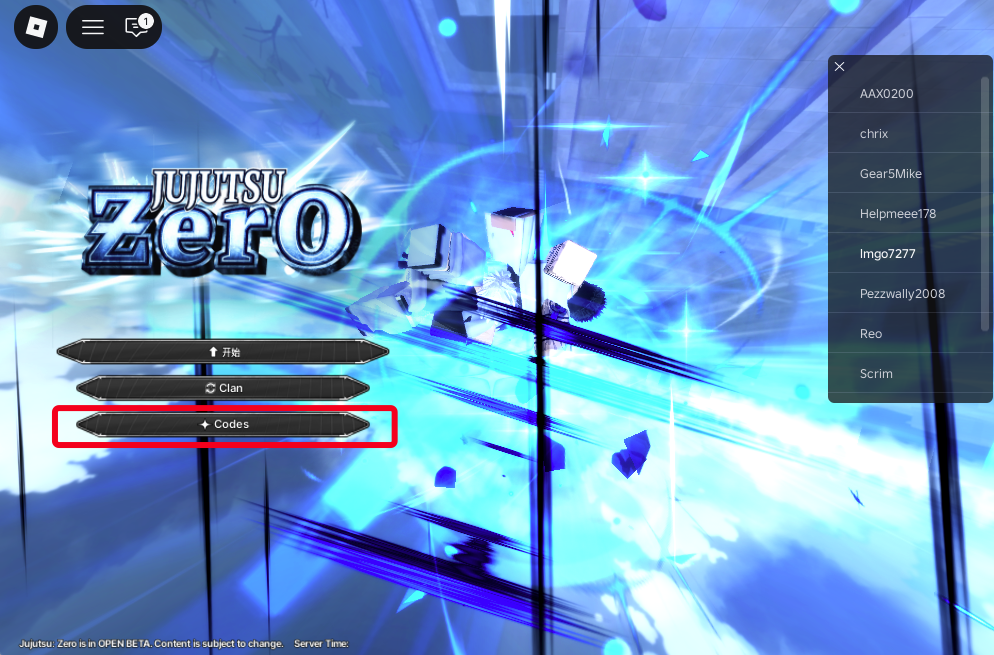
Codes Button Location (Start Screen)
Code(s) Panel (Redeem UI)
Quick Safety Note (Avoid Fake Codes)
Never enter your password, email, or any off-site “verification” for game codes. Real Jujutsu Zero codes are redeemed inside Roblox, inside the game UI.
If a site asks you to log in or “complete an offer” to get codes, it’s not official and not safe.
How Jujutsu Zero Codes Work
Codes are limited-time promotions that grant bonus rewards. In the game, codes can expire quickly after updates, milestones, or events.
Because code timing changes often, the most helpful habit is treating this page as a checklist: redeem active codes, then use troubleshooting steps if something fails.
If you’re here for rerolls, redeem your codes before rolling clans so you know your real roll total.
Redeeming Tips (So Codes Don’t Fail)
- ✓Copy/paste codes exactly—extra spaces can break a code.
- ✓Try both: rejoin a server and then redeem again if the UI is laggy.
- ✓Redeem codes early after an update: codes often expire faster than players expect.
- ✓If a code fails, check whether it’s case-sensitive and whether you already redeemed it.
Fast Troubleshooting Checklist
- Rejoin a new server and try the code again.
- Paste the code with no leading/trailing spaces.
- Make sure you’re on the correct account (codes may be one-time per account).
- If it still fails, assume it expired or was disabled after the latest update.
Where to Find New Codes (Fast)
Codes usually show up around big events: updates, milestones, or developer announcements. The fastest way to catch them is checking official community channels and then verifying in-game immediately.
If you want to stay efficient, don’t spend time hunting codes across random sites. For Jujutsu Zero, focus on official posts and reputable community updates, then redeem quickly before they expire.
When in doubt, use a simple rule: if a code isn’t redeemable from the in-game Code(s) panel, it isn’t a real code.
Verification Tips (Avoid Wasted Attempts)
- ✓Look for a recent “last verified” timestamp and prioritize those entries first.
- ✓If a code fails, retry once after rejoining—then stop and treat it as expired.
- ✓Don’t add spaces or extra characters; paste only the code text.
- ✓If you redeemed a code already, it may show as invalid on future attempts.
What Rewards Usually Mean (How to Use Them Well)
Some codes give currencies or bonus items that you can spend immediately, and some give resources that are more valuable if you save them.
If you’re early, use rewards to remove bottlenecks: rolls for a better baseline, or currency for upgrades that speed up questing. If you’re later in Jujutsu Zero, consider saving rewards for the next banner or update cycle.
The core idea is the same: use code rewards to increase consistency, not just to gamble. Consistent clears create faster leveling.
How This Page Stays Useful
A codes page only helps if it’s fast to use. That’s why this page keeps three things visible: where to redeem, which codes are active, and what to do when redemption fails.
If you want to keep your own workflow efficient, bookmark this page and check the “last verified” time before you paste. Then redeem the newest entries first so you don’t miss short-lived drops.
If you find a new code that works in Jujutsu Zero, add the date/time you verified it (UTC) so you can tell later whether it’s still current after an update.
Related Jujutsu Zero Guides
Confirmed UI Text
- ✓Panel title: “Code(s)”
- ✓Helper text: “Enter codes for Bonus Rewards!”
- ✓Input placeholder: “Enter Code Here”
- ✓Button: “Redeem”
How to Redeem
- Launch the game on Roblox.
- On the start screen, click “Codes”.
- In the “Code(s)” panel, click the “Enter Code Here” box.
- Paste a working code (no extra spaces).
- Press “Redeem”.
YouTube Bonus (Optional)
On the Codes screen there is a separate box that says: “Subscribe to @Reeelyu on YouTube to get: x25 [Clan Rolls], x3500 [Lumens], x3 [XP Vow]”.
It asks for a “Channel ID Here …” and has its own “Redeem” button. This is separate from normal codes.
Expired Codes
| Code | Reward | Expired (UTC) | Reason |
|---|---|---|---|
| No entries yet. | |||