
Wiki Cluster
Getting Started in Jujutsu Zero (PC)
Confirmed PC controls + movement fundamentals for Jujutsu Zero, so you can quest faster and avoid early-game mistakes.
Beginner Guide (PC)
If you’re new to Jujutsu Zero on Roblox, this guide helps you get started quickly and avoid common early-game mistakes.
It covers confirmed PC controls from the in-game movement tutorial, core movement mechanics, travel efficiency tips, and simple habits that save time while leveling.
If you’re here to complete quests faster, learn keybinds, or understand movement, start with the quick summary and then skim the sections you need.
TL;DR — Quick Start Summary
The in-game tutorial confirms these PC keys in Jujutsu Zero: Q (Dash / Dodge), E (Super Dash), Ctrl (Move Lock), and M (Map).
Combat and ability keys are often shared by the community, but they can change after updates—always verify controls in-game.
Movement Tutorial (Key List)
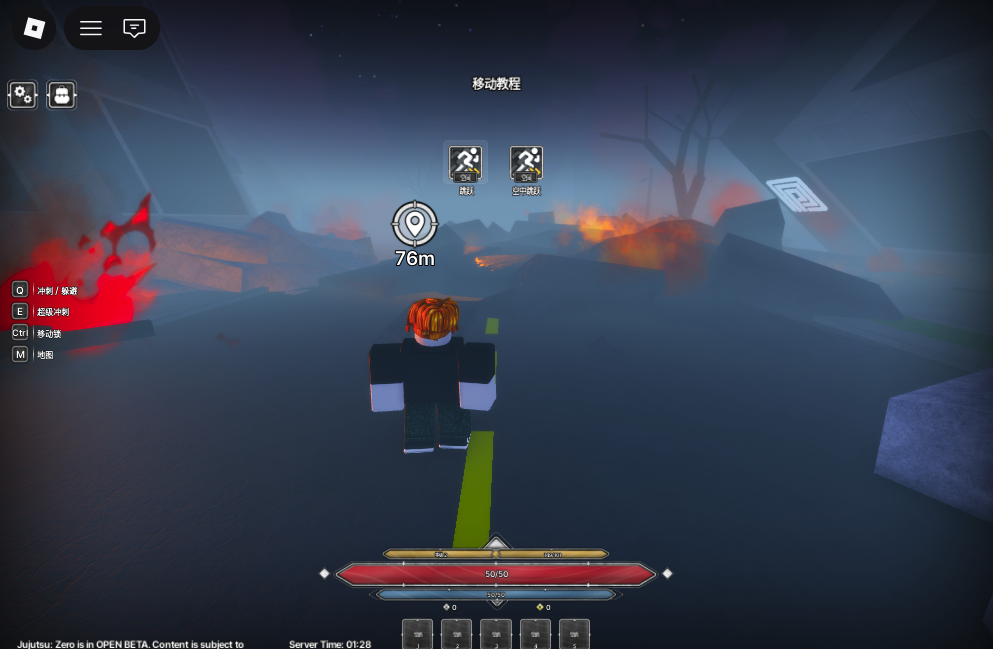
Understanding Movement in Jujutsu: Zero
Movement is one of the most important mechanics in Jujutsu Zero. If you feel slow or confused early on, it’s usually because you’re underusing the game’s movement tools.
The game expects you to dash often, reposition during combat, and move efficiently between quest locations.
Dash and Dodge (Q)
Dash / Dodge lets you make quick side movements to avoid attacks or reposition during fights.
You’ll rely on it constantly in combat, especially against enemies with predictable patterns.
Dash Tips
- ✓Use dash to escape combos, not just to move forward.
- ✓Short dashes are safer than spamming long movement.
- ✓Practice timing instead of button mashing.
Super Dash (E)
Super Dash is one of the most useful keys for beginners. It lets you move much faster across the map and cuts down travel time between objectives.
Treat E as your default travel key when you’re moving between quests, chasing objectives, or crossing open areas.
Move Lock (Ctrl)
Move Lock stabilizes your movement direction. It’s helpful when your camera feels loose, you overshoot targets, or you struggle to aim abilities while moving.
Toggle it when fighting in tight spaces or when precision matters more than speed.
Map (M)
The map is more important than it looks. Opening it often helps you avoid running the wrong direction, locate quest objectives faster, and learn zone layouts early.
A common beginner mistake is relying on memory. A better habit is checking M every time you accept or turn in a quest.
Confirmed PC Controls (From the In-Game Tutorial)
| Action | Key | Notes |
|---|---|---|
| Dash / Dodge | Q | Displayed in the movement tutorial |
| Super Dash | E | Displayed in the movement tutorial |
| Move Lock | Ctrl | Displayed in the movement tutorial |
| Open Map | M | Displayed in the movement tutorial |
Combat & Abilities Keys (Community List — Verify)
| Action | Key | Notes |
|---|---|---|
| Basic Strike | Left Mouse Button | Community-shared default (verify in-game) |
| Lock On | Middle Mouse Button | Community-shared default (verify in-game) |
| Techniques | 1–5 | Community-shared default (verify in-game) |
| Abilities | F / R / X / C | Community-shared default (verify in-game) |
A Practical First Session Plan (30–45 Minutes)
New players often bounce off Jujutsu Zero because the first hour can feel slow. A simple plan fixes that: learn the movement tools, do a short quest loop, and only then worry about deeper systems.
Your goal in this first session is not “perfect optimization”. Your goal is to build control: reliable movement, fewer missed attacks, and less time wasted walking.
If you’re unsure what to do next in Jujutsu Zero, use the checklist below and you’ll always have a clear next step.
Beginner Checklist
- Run the movement tutorial and confirm the key prompts (Q, E, Ctrl, M).
- Practice a short dash pattern: dash → stop → dash (avoid spamming).
- Use Super Dash for every long travel segment between NPCs.
- Open the map after you accept a quest, then plan your route before moving.
- Do 2–3 quests in the same area before switching zones.
- If you keep dying, pause and adjust your play: safer positioning beats speed.
Beginner Tips That Save Time Early
- ✓Use Super Dash (E) between every quest to reduce travel time.
- ✓Toggle Move Lock (Ctrl) when fights feel messy or your aim feels unstable.
- ✓Check the Map (M) more than you think you need to avoid wasted movement.
- ✓Don’t assume the tutorial will repeat key prompts—verify controls after major patches.
Common Early Mistakes (And What to Do Instead)
Most “I’m stuck” moments in Jujutsu Zero come from a small set of habits. Fix the habit and your progress speeds up without needing a new technique or a lucky roll.
Mistake #1 is walking too much. Movement tools exist because the game expects frequent travel. Make Super Dash your default travel button and use the map like a GPS.
Mistake #2 is fighting every enemy the same way. If a mob punishes you for staying close, dash out after your hits. If a boss telegraphs an attack, dodge sideways instead of backing up in a straight line.
Mistake #3 is trying to learn everything at once. In Jujutsu Zero, pick one or two things to improve per session (movement + one combo) and you’ll level faster than someone who constantly swaps strategies.
Movement Habits That Make Combat Easier
- ✓Reposition after your attack string instead of standing still to “see what happens”.
- ✓Dash sideways to avoid telegraphed hits; backpedaling often gets you clipped.
- ✓If you overshoot targets, use Move Lock for tighter control in close-range fights.
- ✓Use the map to reduce “panic running” when you lose track of quest NPCs.
FAQ
Final Thoughts for New Players
Jujutsu Zero rewards players who master movement fundamentals early. Before focusing on advanced techniques or builds, get comfortable with dashing and dodging, Super Dash travel, map awareness, and stable movement control.
Once these habits are locked in, progression becomes faster, smoother, and far less frustrating in Jujutsu Zero.