
Wiki Cluster
How to Redeem Parkour Champions Codes
Step-by-step redeem instructions for Parkour Champions [BETA] by Studio 8K: open Codes, paste a code, press Claim, and troubleshoot if something fails.
Get Codes First
Where to Find Codes (Menu Screenshot)
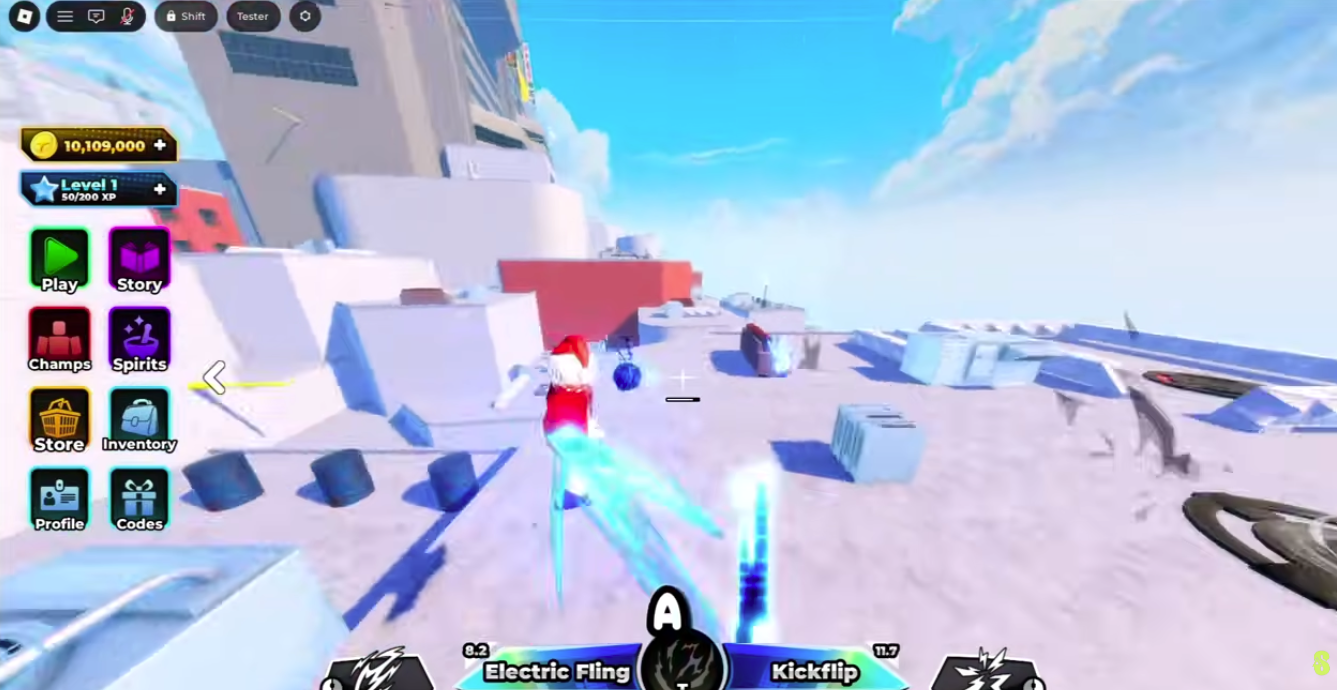
Use the Right Game (Studio 8K)
Roblox has multiple parkour experiences with similar names. This page is for “Parkour Champions [BETA]” by Studio 8K and its Codes → Claim flow.
If your UI does not show a Codes menu, confirm you launched the correct experience first.
What Redeeming Codes Does (And Why You Should Do It Early)
Most Parkour Champions code lists describe codes as limited-time promotions that grant rewards like Coins and Spins. Those rewards matter most when you are early in the game, because they remove bottlenecks and let you test more options sooner.
A good workflow is: redeem codes first, then spend. If you spend first, you can accidentally commit resources before seeing the full amount of Coins/Spins you could have earned for free.
Because codes expire and change often, the most reliable source is the cluster’s Codes & Updates page with last-verified timestamps. This redeem page exists to help you execute quickly and avoid the most common copy/paste failures.
How to Redeem Codes (Step-by-Step)
- Launch Parkour Champions on Roblox.
- Look for the in-game Codes menu on the bottom UI.
- Click/open Codes to bring up the code entry panel.
- Paste a working code exactly as written (no extra spaces).
- Press Claim to receive the reward.
Copy/Paste Rules (So You Don’t Waste Attempts)
Codes fail most often due to invisible formatting issues. The most common problem is a leading or trailing space when you paste. Some systems treat that space as a different character and reject the code as invalid.
To avoid that, use a simple habit: click inside the input field, paste once, then press left arrow and right arrow once to ensure the cursor moves inside the code text (not after a space). If you see the cursor move without moving through letters, you likely pasted a space.
Another habit: don’t manually type codes unless you have to. Copy/paste reduces human error, especially for longer codes or codes with mixed casing. If you do type, double-check every character before pressing Claim.
Finally, don’t spam Claim. If the UI is lagging, spamming can produce inconsistent results. Paste once, press Claim once, wait a moment, then decide your next step.
Edge Cases (When a Code Is Real but Still Fails)
Most failures are simple: expired, already redeemed, or pasted with spaces. But sometimes codes have conditions. Some codes may be tied to an event window, a release milestone, or a community task (for example, Discord-related drops mentioned in some guides).
In rare cases, players also report codes behaving differently depending on server state. If a code is widely reported working but fails for you, try the controlled rejoin retry once, then stop. If it still fails, wait for official clarification instead of repeatedly spamming the UI.
The goal is to keep your workflow efficient: you want to spend seconds redeeming, not minutes arguing with a code that likely won’t work anymore.
If Claim Fails (The Fast Troubleshooting Order)
- ✓Step 1: Re-paste the code with no leading/trailing spaces.
- ✓Step 2: Rejoin a new server and try one more time (server/UI lag happens).
- ✓Step 3: Assume the code expired or you already redeemed it if it still fails.
- ✓Step 4: Confirm you’re in Parkour Champions by Studio 8K (not another parkour game).
When Codes ‘Work’ But You Don’t See Rewards
Sometimes a code redemption is accepted but the reward doesn’t immediately show up in your inventory or currency count. This is usually a UI refresh issue rather than a lost reward.
If you suspect this happened, don’t panic and don’t keep redeeming. First, close the codes panel and reopen it. Then check the area of the UI where Coins or Spins are displayed. If the UI still looks unchanged, rejoin a server and check again.
If you redeemed multiple codes quickly, consider waiting a moment between codes to give the UI time to update and to reduce the chance of confusion about which reward came from which code.
Redeem Order (The Small Habit That Saves the Most Time)
Redeem the newest verified codes first. Codes often drop around updates and can be disabled quickly. If you start from the oldest code on a long list, you are more likely to waste attempts.
After redeeming, take a short pause to confirm your totals changed (Coins/Spins). This avoids the common confusion where players redeem multiple codes and later can’t tell which ones worked.
Finally, redeem before spending. If you spend Coins or Spins first, you lose the chance to make a better plan with your real total.